Languages and Regions
In this document, you will learn how to customize your decídalo user interface by changing the language settings and adjusting the region to suit your preferences. Follow these steps to ensure your interface is tailored to your needs.
To change the language of the user interface, begin by navigating to your profile. Click on the "My Profile" menu item. Once on your profile, choose the "Accounts" tab.
Scroll down to the "Screen language & region" section and select your preferred screen language. At present, decídalo supports German, English, French, Japanese, and Spanish as user interface languages.
Note: The screen language is the language in which the user interface is shown. Profiles, CVs or Project References can be maintained in any language. decídalo uses an AI translation service to automatically create CVs and References in different languages.
Once you have selected the language, proceed to set your region. The region defines the format for dates and numbers.
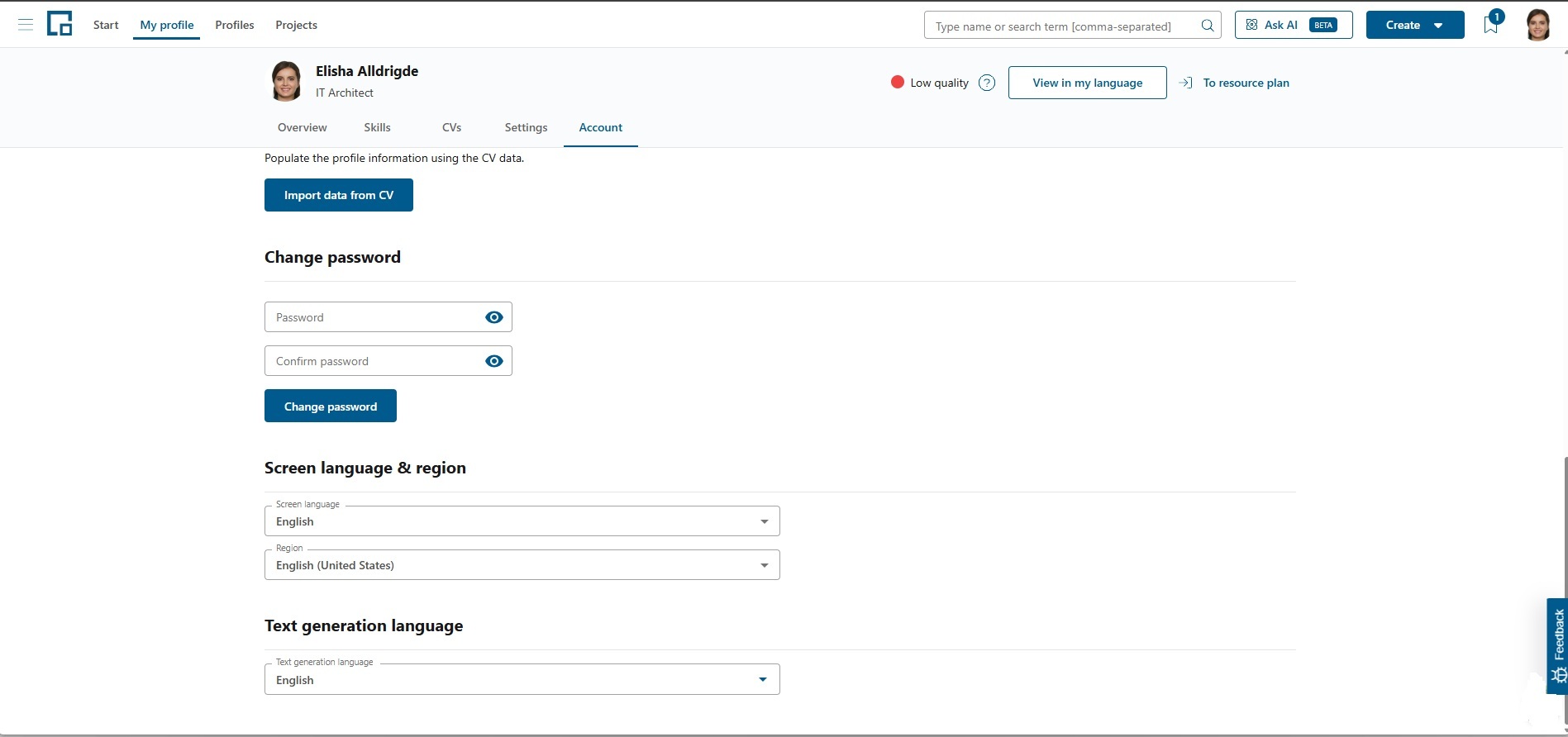
Profile text generation language
decídalo can generate profile text with AI: your summary, core competencies, and the tasks, responsibilities and descriptions of your projects. The "Profile text generation language" setting on the Accounts tab controls which language that generated text is written in.
By default it is set to "Use screen language", which appears at the top of the dropdown and follows your current screen language. You can instead pick any language: the languages configured for your organisation are listed under "Common languages", and the remaining supported languages under "Other languages". Users with the profile edit permission can change this setting on a profile.
For more information about administrative tasks, see Administration.