Agent Access
Agent Access controls whether external AI agents, such as Claude, GitHub Copilot, or the Gemini CLI, can reach your organization's decídalo data through the MCP (Model Context Protocol) server. From this page an administrator turns the integration on or off for the whole organization and finds ready-made connection snippets for each supported agent.
Note: Agent Access is a Beta feature and requires administrator permissions. You'll find it under Administration → System settings → Agent access.
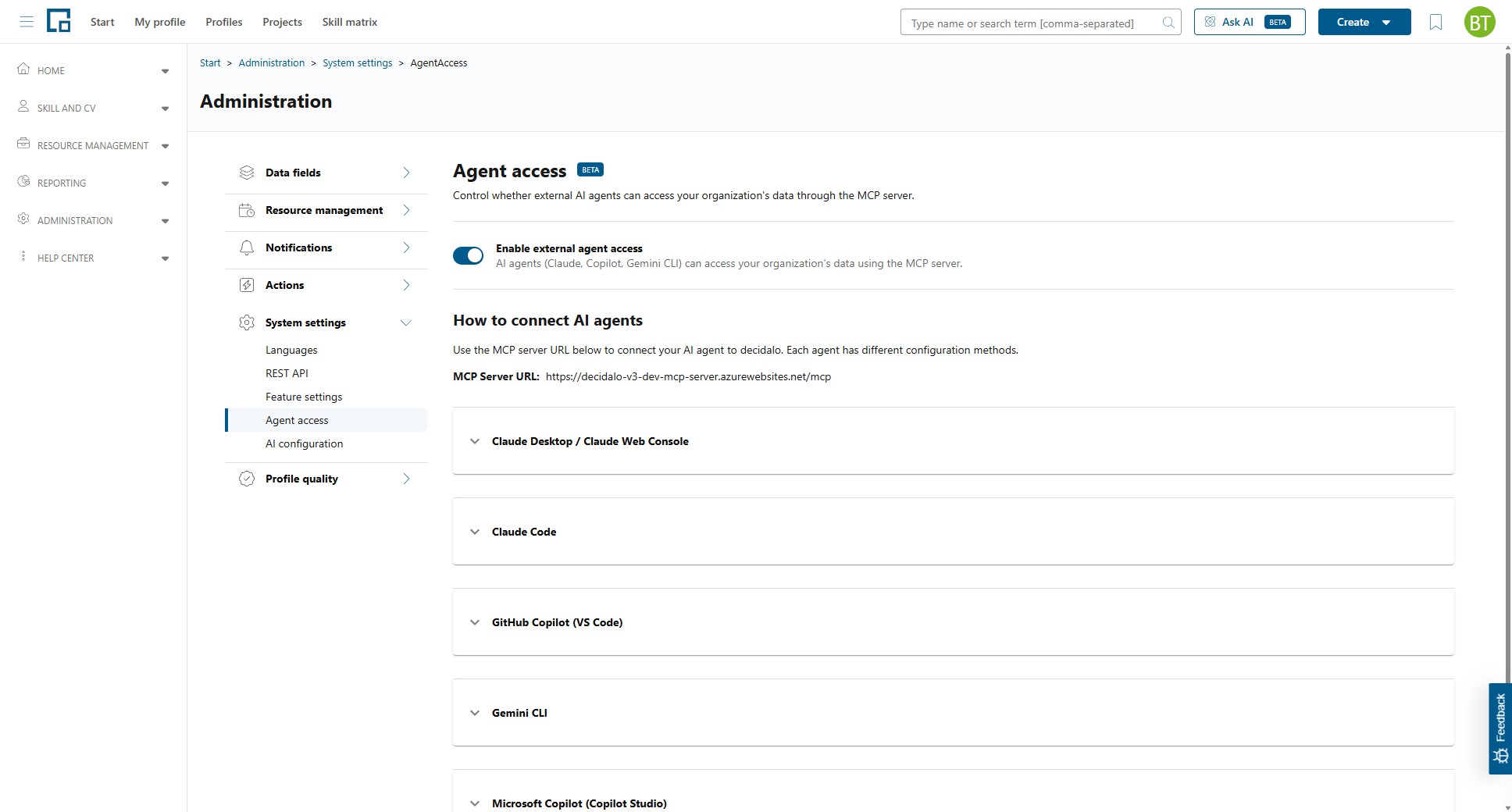
Enable external agent access
Use the toggle at the top of the page to switch external agent access on or off for your organization.
| Control | Description |
|---|---|
| Enable external agent access | When on, AI agents (Claude, Copilot, Gemini CLI) can access your organization's data through the MCP server. When off, external agent access is disabled and users cannot connect AI agents to your organization's data. |
The change takes effect immediately; there is no separate save step.
Access is always scoped to the connecting user. Each user authenticates with their own decídalo credentials, so an agent only ever returns data that user is permitted to see.
How to connect AI agents
This section provides everything users need to connect their own AI agent to decídalo. Share the MCP Server URL shown on the page with your users. It is the single address every agent connects to.
| Field | Description |
|---|---|
| MCP Server URL | The address agents connect to. Copy this value into the agent's MCP configuration. |
If the MCP Server URL shows NOT SET, the server address is not configured in this environment. The connection examples are placeholders until an administrator configures it.
Each agent has its own configuration method. Expand the matching section for step-by-step settings:
| Agent | How to connect |
|---|---|
| Claude Desktop / Claude Web Console | Add a user-defined connector (may require admin rights). Enter a name of your choice (e.g. "decidalo") and the MCP server URL. |
| Claude Code | Run the displayed claude mcp add … command in your terminal, then use the /mcp command inside Claude Code to authenticate. |
| GitHub Copilot (VS Code) | Add the displayed configuration block to your .vscode/mcp.json file (or create it in your workspace root). |
| Gemini CLI | Run the displayed gemini mcp add … command in your terminal, then use the /mcp command inside the Gemini CLI to authenticate. |
| Microsoft Copilot (Copilot Studio) | Setting up the MCP server in Microsoft Copilot requires several configuration steps. Follow the dedicated guide: Microsoft Copilot. |
Use the Copy button next to each snippet to copy it to your clipboard.