Project status automation
To simplify the handling of resource requests or bookings assigned to projects, decídalo supports with an automatic postprocessing of project status changes. The automation can be activated and configured in the ‘Administration’ menu item under ‘Resource management’ and ‘Project Status Automation’.
Note: Only users with the permission ‘Manage Users, Teams, and Permissions’ can configure the automation. It is activated by default.
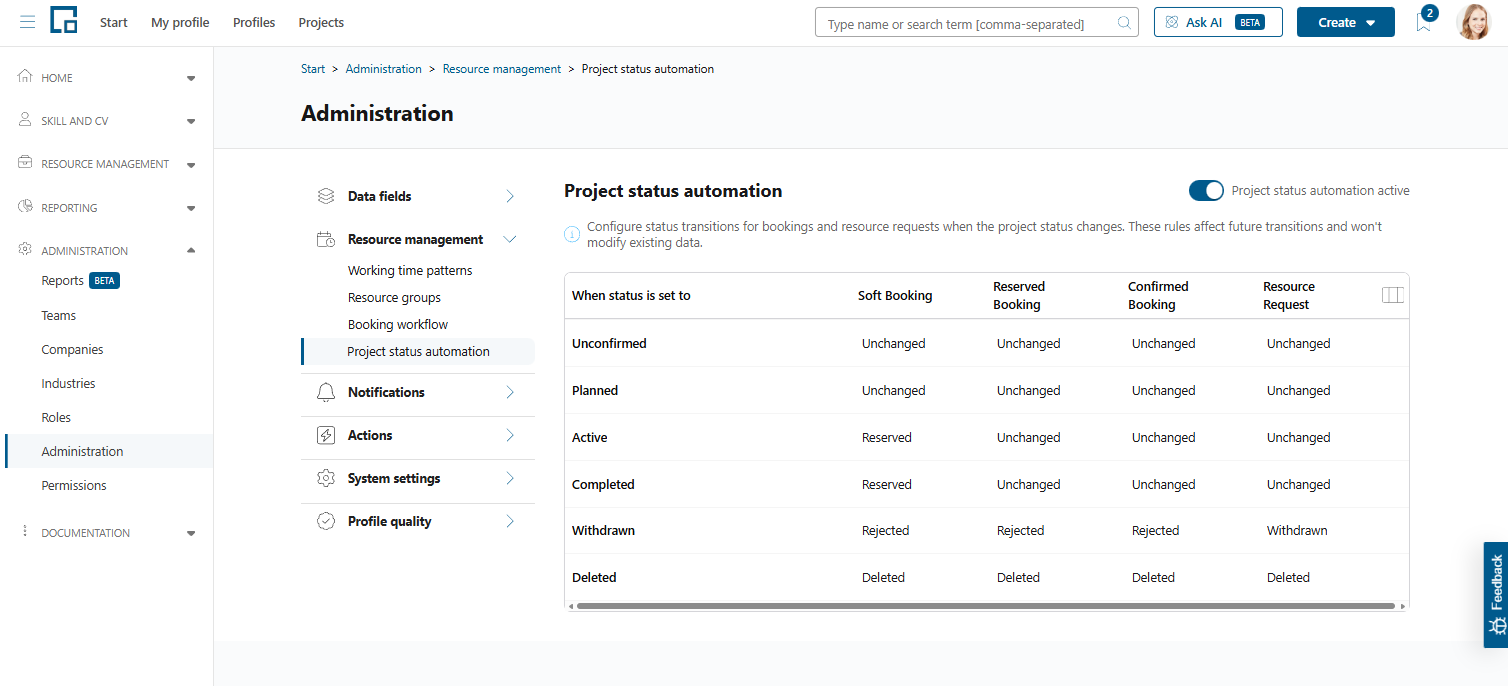
The automation can be activated by the switch in the top right corner, and configured using the selection dropdowns in the displayed table. A typical example use case is: If a project is withdrawn, all connected resource requests and bookings should be rejected, because they are not needed anymore. By default, this is already set up and can be seen in the 4th row of the table.
Note: When a resource request is set to ‘Done’ or ‘Withdrawn’, by the automation or by hand, its open internal marketplace applications and candidate suggestions are rejected as well, the request is taken off the internal marketplace, and the applicants are informed by email. One project status change can therefore close several requests and notify every applicant on each of them.
Note: Changes to the project status automation will only apply in the future and will not modify existing data.
Note: The ‘Deleted’ row is activated, if the project status automation feature is activated globally. The row cannot be edited. That ensures the automatic deletion of orphan resource requests and bookings, after a project has been deleted.