Servicesheets
Note: Billing is currently a beta feature and is being rolled out with pilot customers. If you would like to take part, please get in touch with us.
A servicesheet is decídalo's record of the work delivered to a customer in a period: what was done, by whom, for how long and at what rate. This page covers composing one, what happens to the recorded time behind it, and how it travels from draft to paid.
Open the list under Finance → Servicesheets. Everything here requires the Manage billing permission.
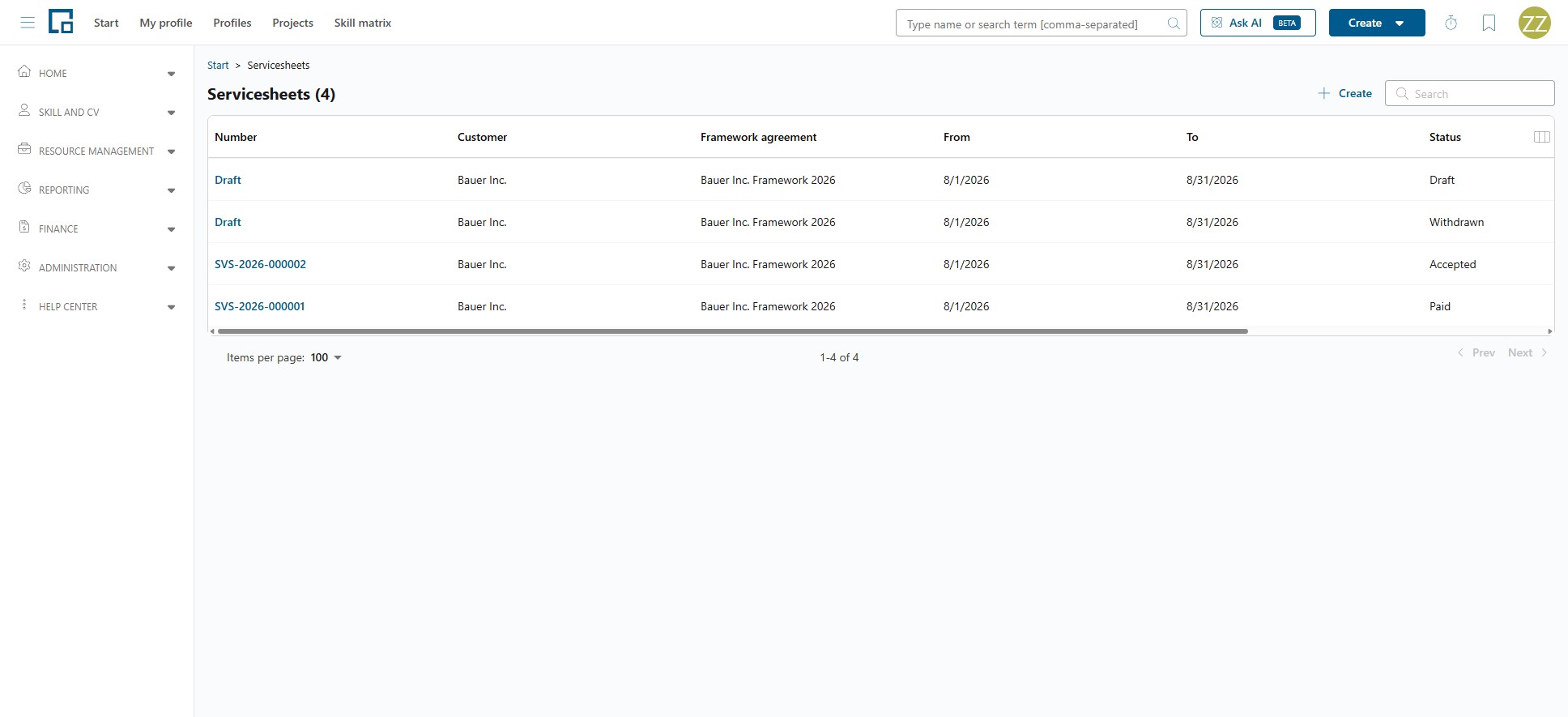
| Column | Description |
|---|---|
| Number | Assigned when the servicesheet is accepted. A draft shows "Draft" instead. |
| Customer | The company it is for. |
| Framework agreement | The agreement it falls under, if any. |
| From / To | The period it covers. |
| Status | Draft, Accepted, Paid or Withdrawn. |
| Total | The net total, in the currency it was issued in. |
An empty list offers its own Create servicesheet button, so a first servicesheet can be started from here too.
Composing a servicesheet
There are two ways in, and both open the same composer full screen.
From Billable work: start from a row, and the composer is already scoped to that order.
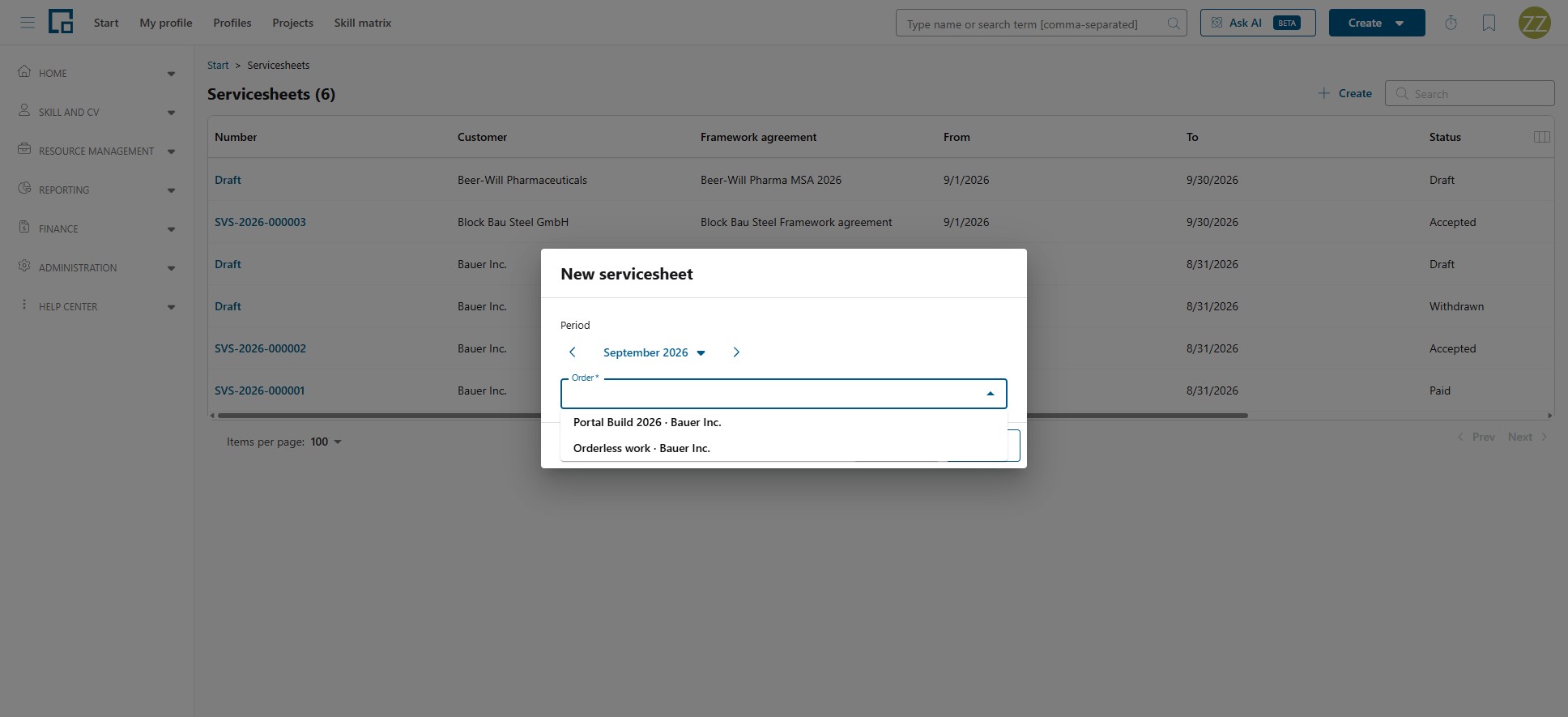
From this page: Create in the toolbar opens New servicesheet, which asks for the two things a composer needs: the Period, and then the Order to bill. The orders offered are exactly the ones with something invoiceable in that period, so picking the period first decides what there is to compose; orderless billable work appears as its customer's own entry, reading "Orderless work · «Customer»". If nothing is invoiceable in the chosen period, the order field is replaced by that message, so widen the period.
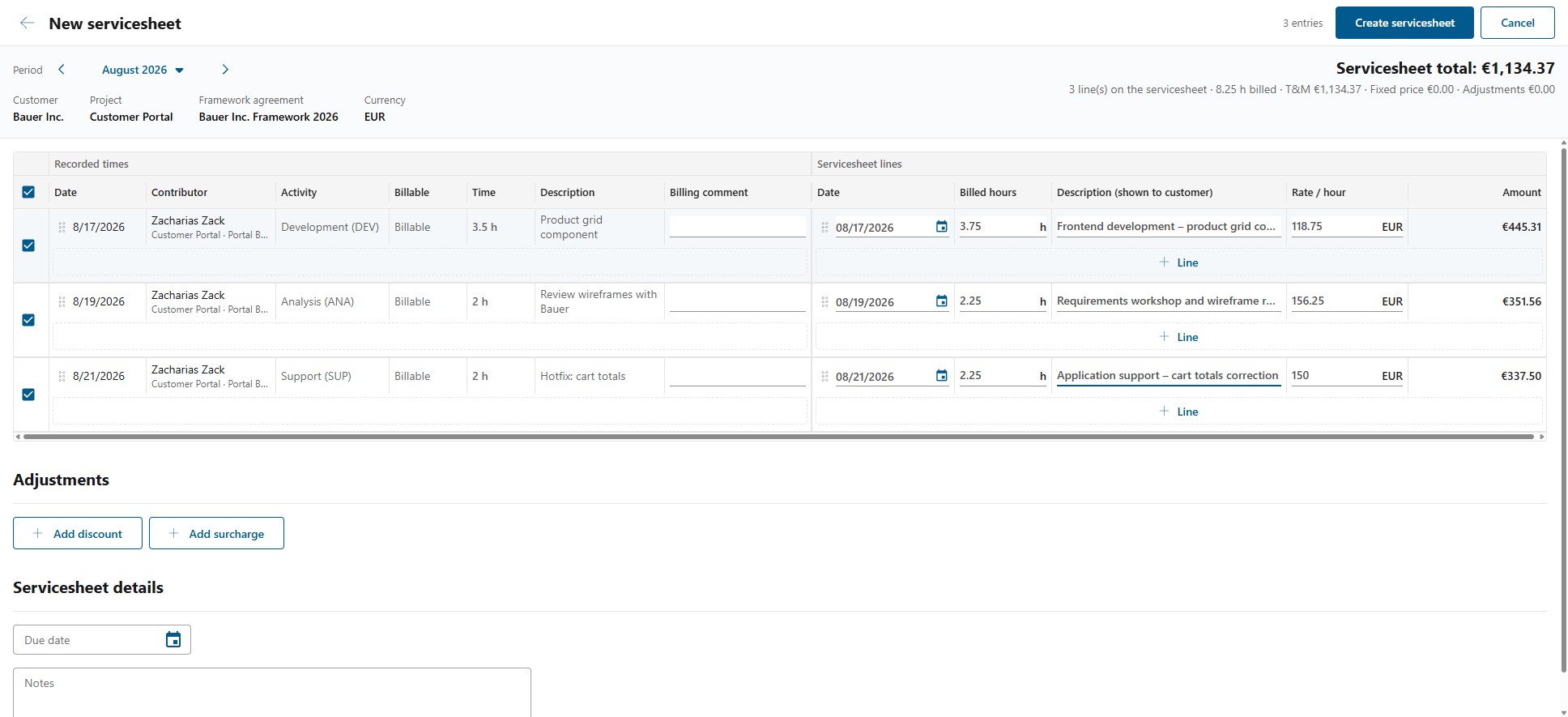
The bar at the top keeps the scope and the running result in view while you work: the Period (adjustable here), the Customer, Project, Framework agreement and Currency, and on the right the Servicesheet total with the number of lines, the hours billed, and the split into T&M, Fixed price and Adjustments.
Recorded time → servicesheet lines
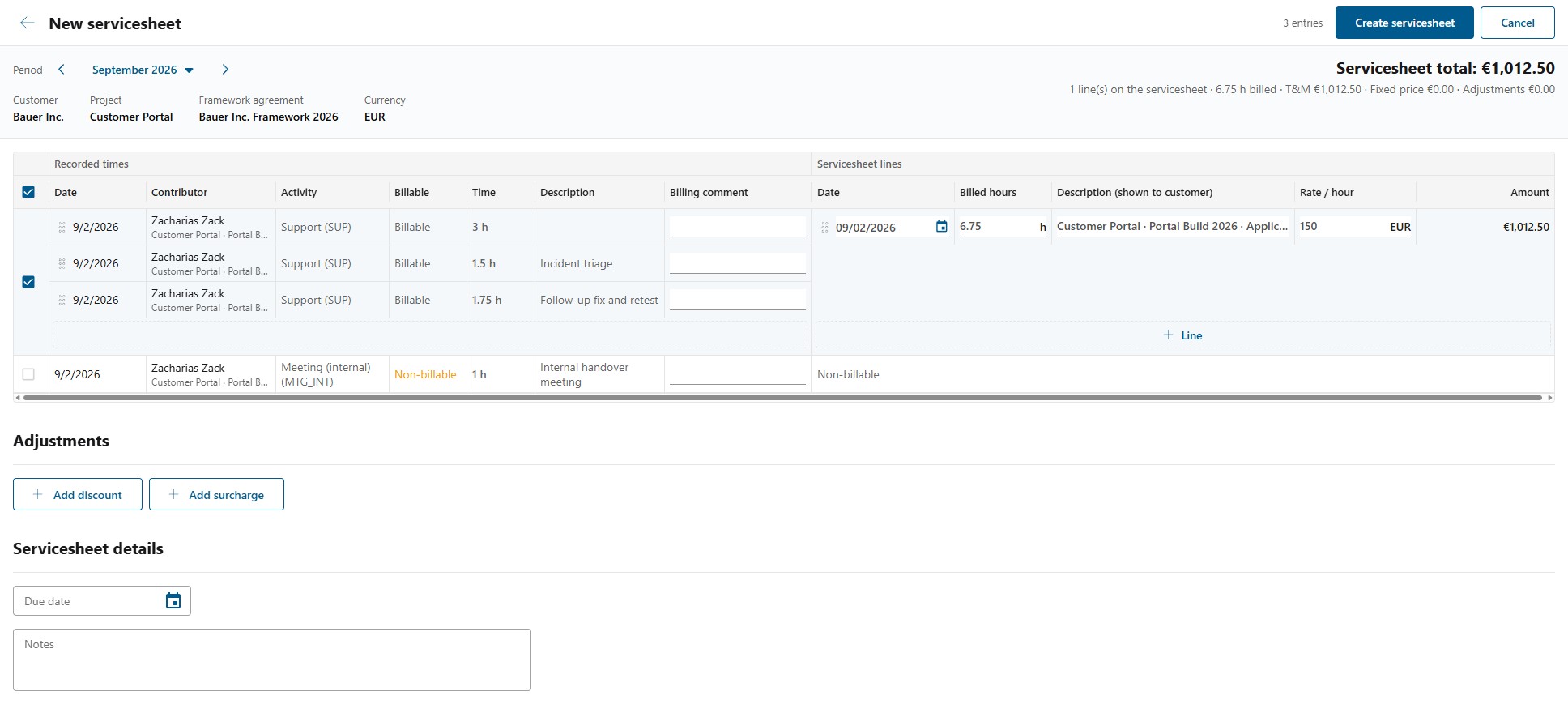
The main grid has two sides. On the left are the recorded times as your people entered them; on the right are the servicesheet lines those entries produce, which is what the customer will see. One big row maps one to the other, and you decide how they map:
| Action | How |
|---|---|
| Combine entries onto one line | Drag a recorded entry onto another row. |
| Split an entry onto its own line | Drag it onto its own row's drop zone, or use Move to its own row. |
| Move a line to another row | Drag the servicesheet line onto that row. |
| Add another line to a row | Use the + line zone. |
| Add a line that is not time | Add amount, for a fixed-price item. |
| Take a line off | Remove line. |
| Take an entry off the servicesheet | Clear Include on servicesheet on that entry. |
Per line you set the Description (shown to customer), the Billed hours and the Rate / hour. The hours arrive prefilled from the duration rules and are yours to change, including time the rules excluded, which is marked "Excluded by the duration rules". The rules set the starting point; you decide the result. See How recorded time becomes billed hours.
Use Filter recorded entries to narrow the left-hand side by Activity, Billable or Contributor while you work. Non-billable entries are shown and marked, so nothing is invisible.
decídalo warns you rather than blocking you:
- "{count} included row(s) have no amount yet. Set a rate or fixed price to bill them."
- "This exceeds the agreed amount: … already billed on other servicesheets, … agreed, … on this servicesheet, … too much."
The billing comment
Each recorded entry can carry a Billing comment, typically why that time was, or was not, billed. It belongs to the entry, not to the servicesheet, so it survives a withdrawn draft and is there again the next time that entry comes up for billing. The person who recorded the time does not see it in their timesheet; reading and writing it require Manage billing.
Adjustments and details
Adjustments adds a Discount or a Surcharge, each with a Type, a Description and an Amount. They feed the total's adjustments figure.
Servicesheet details carries the Due date and free-text Notes.
Click Create servicesheet to save it. It is created as a Draft.
From draft to paid
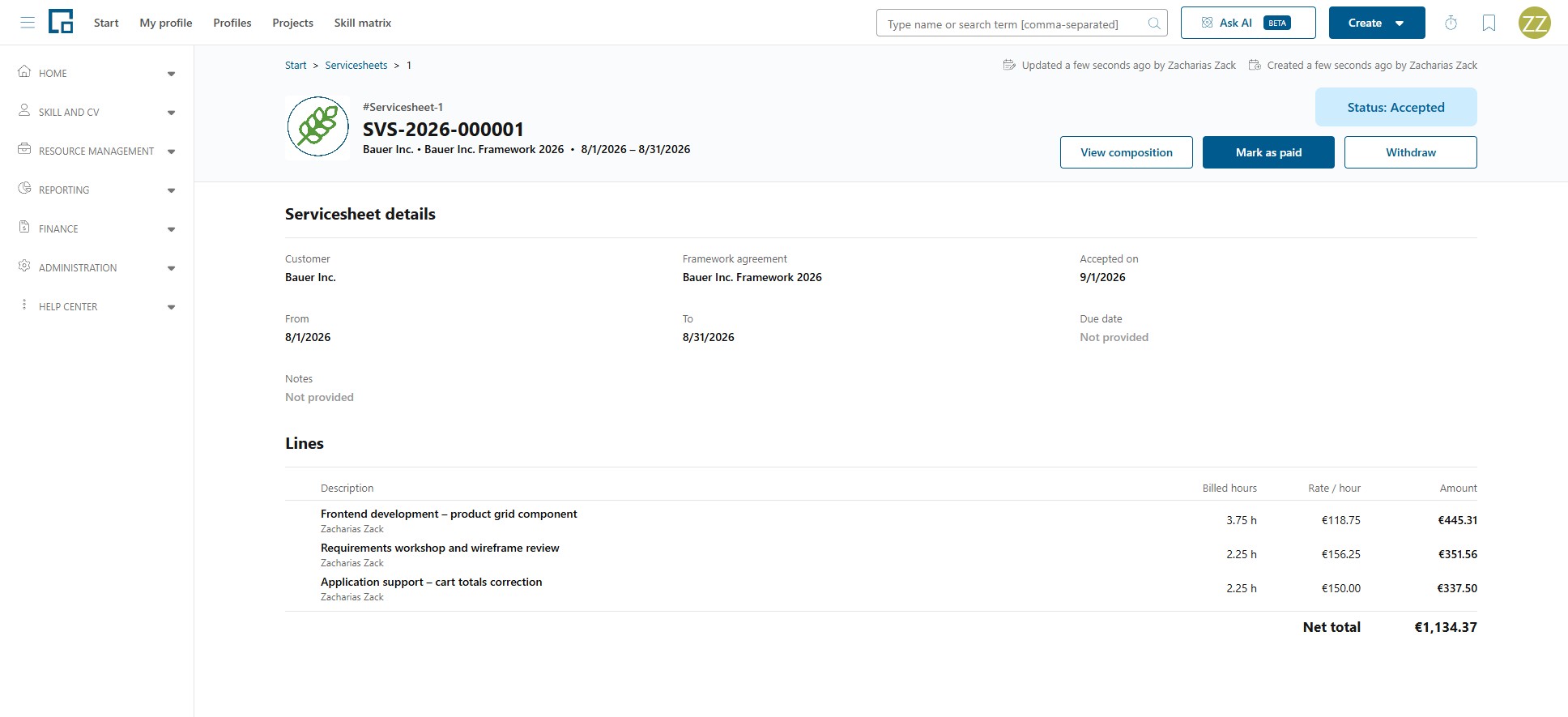
A servicesheet's detail page shows its details, its Lines with description, billed hours, rate and amount, and the Net total. Which actions it offers depends on the status.
| Status | Available actions |
|---|---|
| Draft | Edit, Accept, Withdraw |
| Accepted | View composition, Mark as paid, Withdraw |
| Paid | View composition |
| Withdrawn | View composition |
Edit reopens the composer. It is available for drafts only: once a servicesheet is accepted the composition can still be inspected with View composition, but not changed.
Each move asks first:
- Accept: "Accept this servicesheet? It will not be editable anymore. You can still withdraw it afterwards." A number is assigned and the acceptance date is set.
- Mark as paid: "Mark this servicesheet as paid? This cannot be undone."
- Withdraw: "Withdraw this servicesheet? Its recorded time will be released for billing again."
What this does to the recorded time
A servicesheet locks the time it contains from the moment it is created, while it is still a draft, and stores those times as a snapshot so they cannot change underneath it. In the recorder's timesheet those entries show as Issued, "On a servicesheet (locked)".
That status means "on a servicesheet", not "accepted by the customer". Withdrawing the servicesheet releases the entries and they become billable again.