Billing concept in decídalo
Note: Billing is currently a beta feature and is being rolled out with pilot customers. If you would like to take part, please get in touch with us.
Billing is the second half of time recording: it turns recorded hours into servicesheets. A servicesheet is decídalo's record of the work delivered to a customer in a period: what was done, by whom, for how long and at what rate. The work it does is the step in between: taking the time your people recorded and turning it into the hours and amounts that go to the customer.
Six places are involved. Four are billing pages in the Finance area of the menu (Orders, Framework agreements, Servicesheets and Billable work), and two are on the project itself: the Accounting tab for the commercial setup, and the Delivery tab for the recorded time and its billing state.
This page explains how they fit together and what the rules are. Step-by-step articles for each of them are linked under Detailed guides.
From recorded time to a servicesheet
The commercial structure and the recorded time meet at the order position. Reading from the top down:
- A framework agreement holds the commercial frame for one customer: its name and number, a currency, a validity period, and a set of rate entries. It owns a set of projects, and a project can belong to at most one framework agreement.
- An order represents what the customer actually ordered. It carries an order date, a currency, addresses and payment terms, its own Rates tab, and it can serve several projects. An order is billed in exactly one currency (see Currencies and totals).
- Positions are the lines of that order. Each position is either Fixed price or Time & material, and it is the position that carries the rate. A position has no currency of its own: it is priced in its order's.
- People record time against the project, one of its work packages, or a position (see What you record time on).
- Recorded time is confirmed on the project's Delivery tab (see Confirming recorded time).
- Billable work collects everything that is now ready to be billed, grouped by order.
- A servicesheet is composed from those entries and then accepted.
What makes recorded time billable
Four rules decide whether an hour can appear on a servicesheet.
It has to be billable. Billability comes from the activity type's Billable by default, unless the project, work package or order position overrides it with Always billable here or Never billable here. Non-billable time is still shown, so effort stays visible, but it can never be charged.
General activities are never billable. Internal meetings, training, vacation and sick leave are recorded for the record only.
Suggested entries never count. A suggestion has to be accepted first, which turns it into a normal entry.
The status has to be far enough along, and how far depends on the Time recording approval setting:
| Setting | Billable statuses |
|---|---|
| On | Only Confirmed entries. |
| Off | Open and Confirmed entries alike. |
See Time Recording Setup for the setting itself.
With the setting on, how quickly an entry reaches Confirmed is the individual project's decision: a project that requires approval waits for somebody to confirm, and a project that does not (the default) confirms its time as it is entered, so it is billable straight away. See When confirmation is needed.
Entries that are already on a servicesheet are excluded, so the same hour cannot be billed twice.
How recorded time becomes billed hours
The hours that go onto a servicesheet are not always the raw recorded ones. Your company's duration rules sit in between: they can enforce a minimum per subject and day, round up to a step, cap a person's day, or move the excess to the next working day.
The rules judge a day's work on one subject as a whole, not each stopwatch entry: all of one person's entries on the same subject on the same day are combined first, and the minimum and the rounding then apply once to that combined time. Recording a task in five short bursts therefore bills the same as recording it in one.
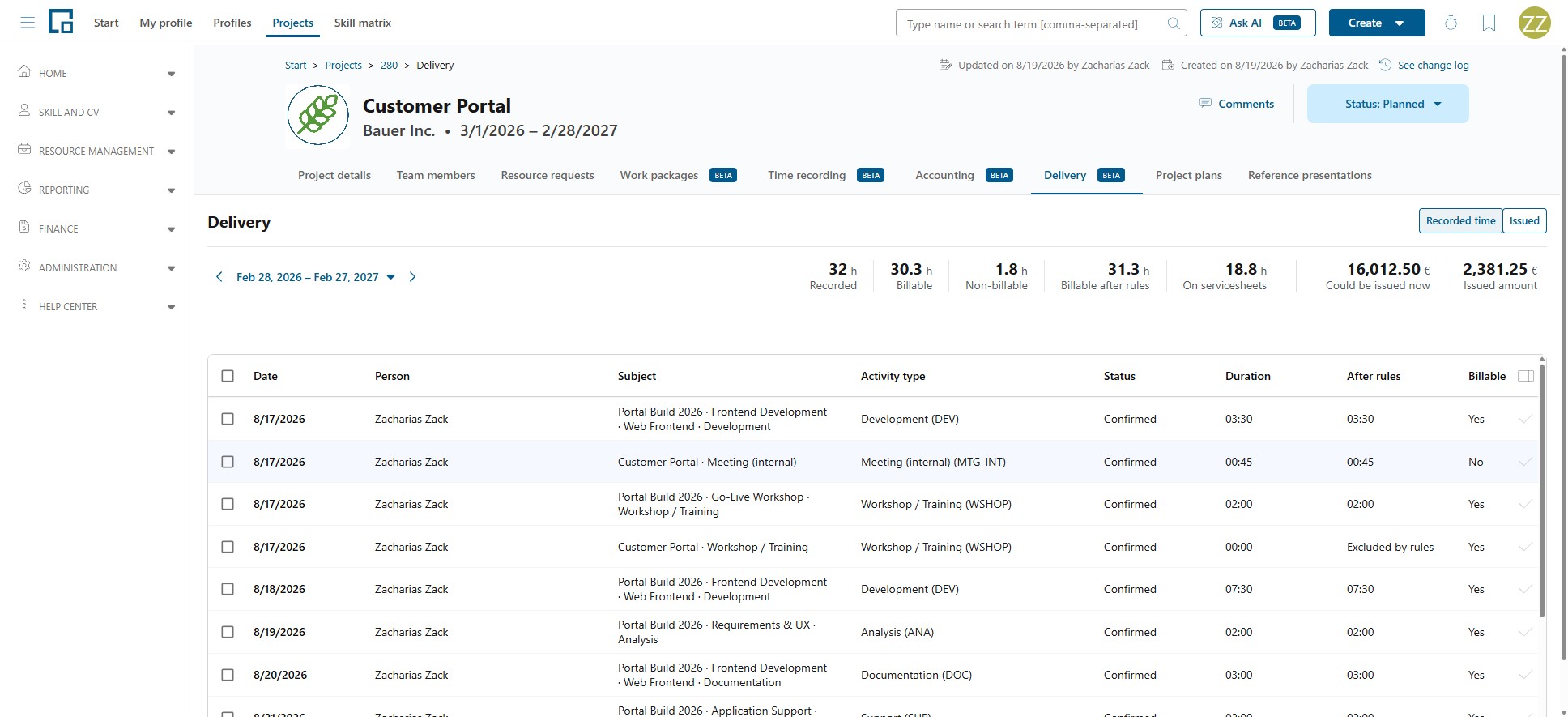
Which rules apply is decided by the servicesheet policy on the order, or on the project, for time recorded straight to a project or work package. The project's Delivery tab shows the effect per entry (After rules, Billable after rules, Excluded by rules) before anything is billed.
The Delivery figures resolve the rules per entry: an entry is shaped by the rules of the order it is priced from, and the project's own rules apply to time recorded straight to a project or work package. Where the project's orders use different policies, the figures say Duration rules: vary by order rather than naming one.
The rules prefill the servicesheet rather than fixing it. When the servicesheet is composed, the proposed hours are shown and can still be changed by hand, including time the rules excluded. So the policy sets the starting point and the person doing the billing decides the result.
Where the rate comes from
The rate lives on the order position. A rate given per Hour is used as it stands. A rate given per Person day is converted to an hourly rate by dividing it by eight, a fixed figure rather than your company's working time pattern, so a person day always means eight hours here regardless of how long the people involved actually work. A Fixed price position carries a lump sum instead of a rate.
Rates are filled in through a chain of prefills, and each step is a copy:
Rate card → Framework agreement rate entries → Order rates → Position
- Prefill from rate card copies a rate card's entries into a framework agreement.
- Prefill from framework agreement copies the agreement's rate entries into an order's Rates tab.
- Rate from catalog prices a position from the order's own rates or from the central catalogue.
Because each step copies rather than links, editing a rate card afterwards does not change agreements or orders that were created from it, and editing an agreement does not change orders already prefilled from it. That is deliberate: an agreed price should not move under a customer's feet. It also means a price correction has to be applied where it is used, not only at the source.
Rate cards and framework agreements are the accounting end of this chain and require Manage accounting; the servicesheet at the end of it requires Manage billing. See Rate cards.
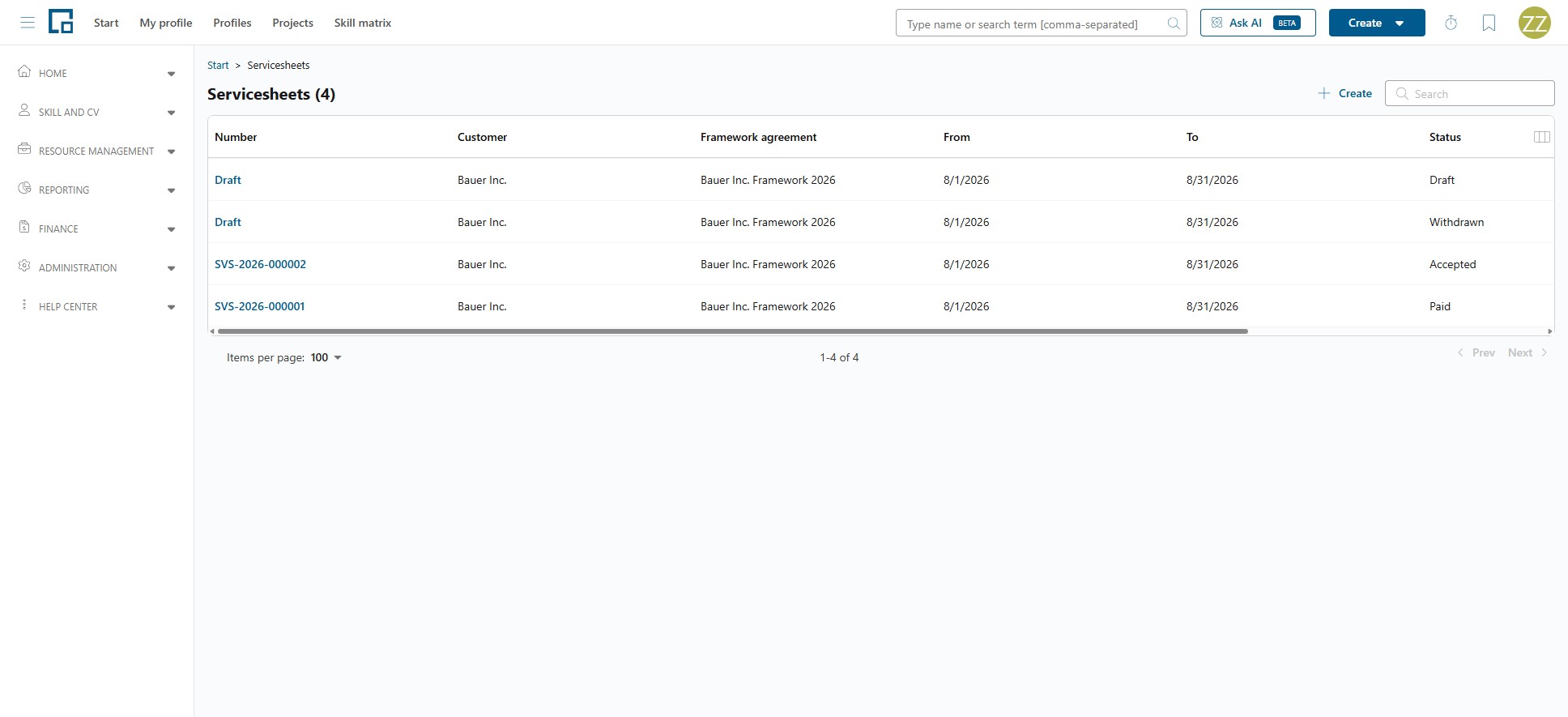
Servicesheet statuses
| Status | Meaning |
|---|---|
| Draft | A working draft. Its lines, adjustments and period can still be changed, and no number has been assigned yet. The list shows "Draft". |
| Accepted | Agreed with the customer. A number is assigned, the acceptance date is set, and the servicesheet can no longer be edited. |
| Paid | Accepted and settled. Final. |
| Withdrawn | Taken back. The recorded time is released and can be billed again. Final. |
The moves between them, with the confirmation each one asks for:
- Accept (from Draft): "Accept this servicesheet? It will not be editable anymore. You can still withdraw it afterwards."
- Mark as paid (from Accepted): "Mark this servicesheet as paid? This cannot be undone."
- Withdraw (from Draft or Accepted): "Withdraw this servicesheet? Its recorded time will be released for billing again."
Note: A servicesheet locks its recorded time from the moment it is created, while it is still a draft. It stores the times as they were at that point, so they cannot change underneath it. In the timesheet those entries show as Issued, which means "on a servicesheet", not "accepted by the customer".
Where you see billing information
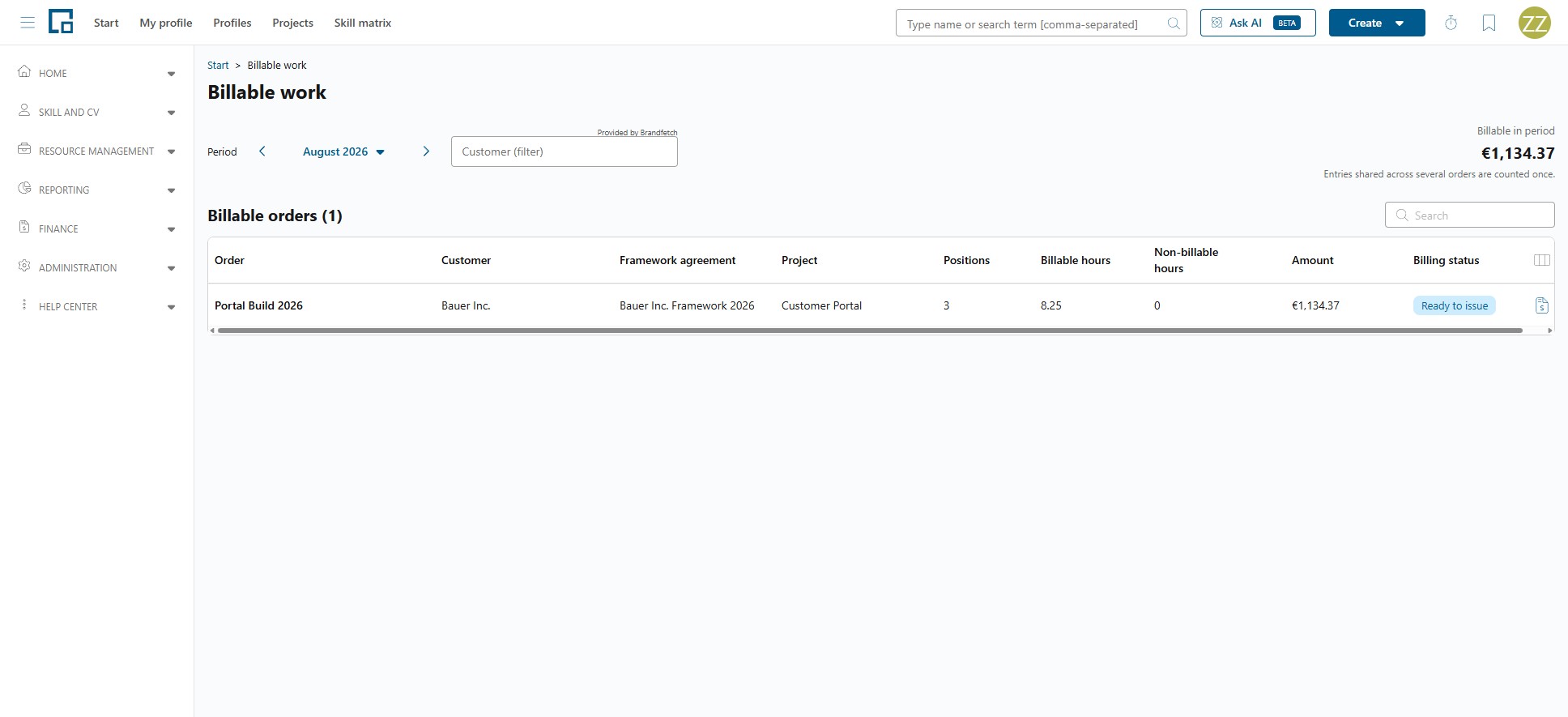
Billable work answers "what could we bill right now?" for a chosen period, defaulting to last month. The Billable in period total is shown per currency, with the note "Entries shared across several orders are counted once." The Billable orders grid lists one row per order with its customer, framework agreement, project, positions, billable and non-billable hours, amount, and a billing status of Ready to issue, Partially issued or Fully issued. From a row you go straight into creating a servicesheet.
Servicesheets lists everything ever created, with number, customer, framework agreement, period and status. Opening one shows its details and its lines. Behind the lines sits the composition (which recorded entries produced which line), reached with Edit while the servicesheet is still a draft and with View composition once it is not, so any amount can be traced back to who recorded what on which day.
The project's Delivery tab answers the same question for one project: the recorded entries with their billing state, plus the totals Recorded, Billable, Non-billable, On servicesheets, Could be issued now and Issued amount.
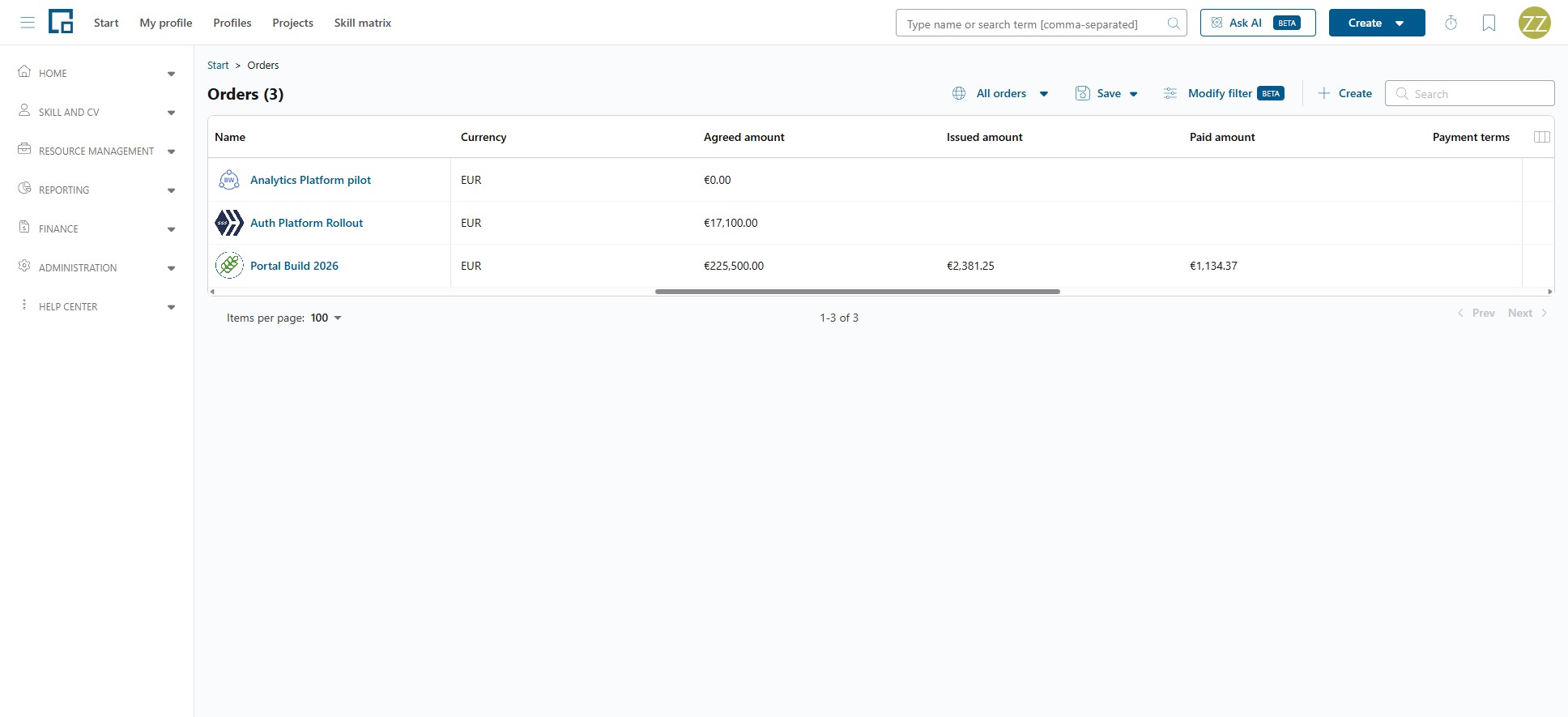
The Orders grid answers "how far along is each order?" at a glance. Alongside the customer and the order's own fields it carries three amount columns, each shown with the currency it is in. Agreed amount is what was sold, added up over the order's positions in the order's Currency: a fixed-price position's lump sum, or rate × sold quantity for a time & material one. Issued amount and Paid amount come from the other side: they add up the order's servicesheet lines, in the currency those servicesheets were issued in: everything on a servicesheet that has not been withdrawn, drafts included, and the part of that already settled. All of them sort and filter like any other column. For an order whose servicesheets were issued in more than one currency, which is only possible for orders predating the one-currency rule, the two cells stay empty rather than showing one currency's subtotal as the total; the order's detail page breaks those amounts down per currency.
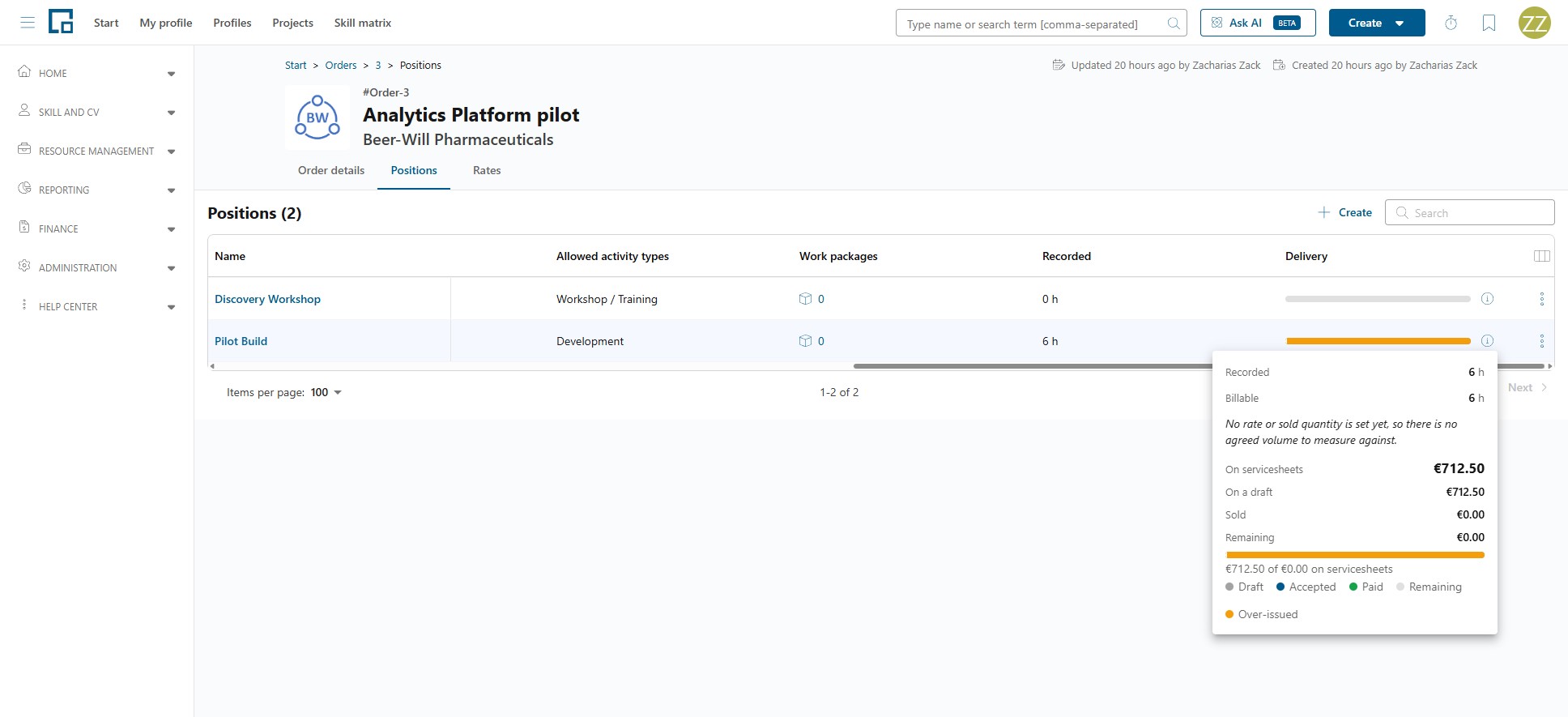
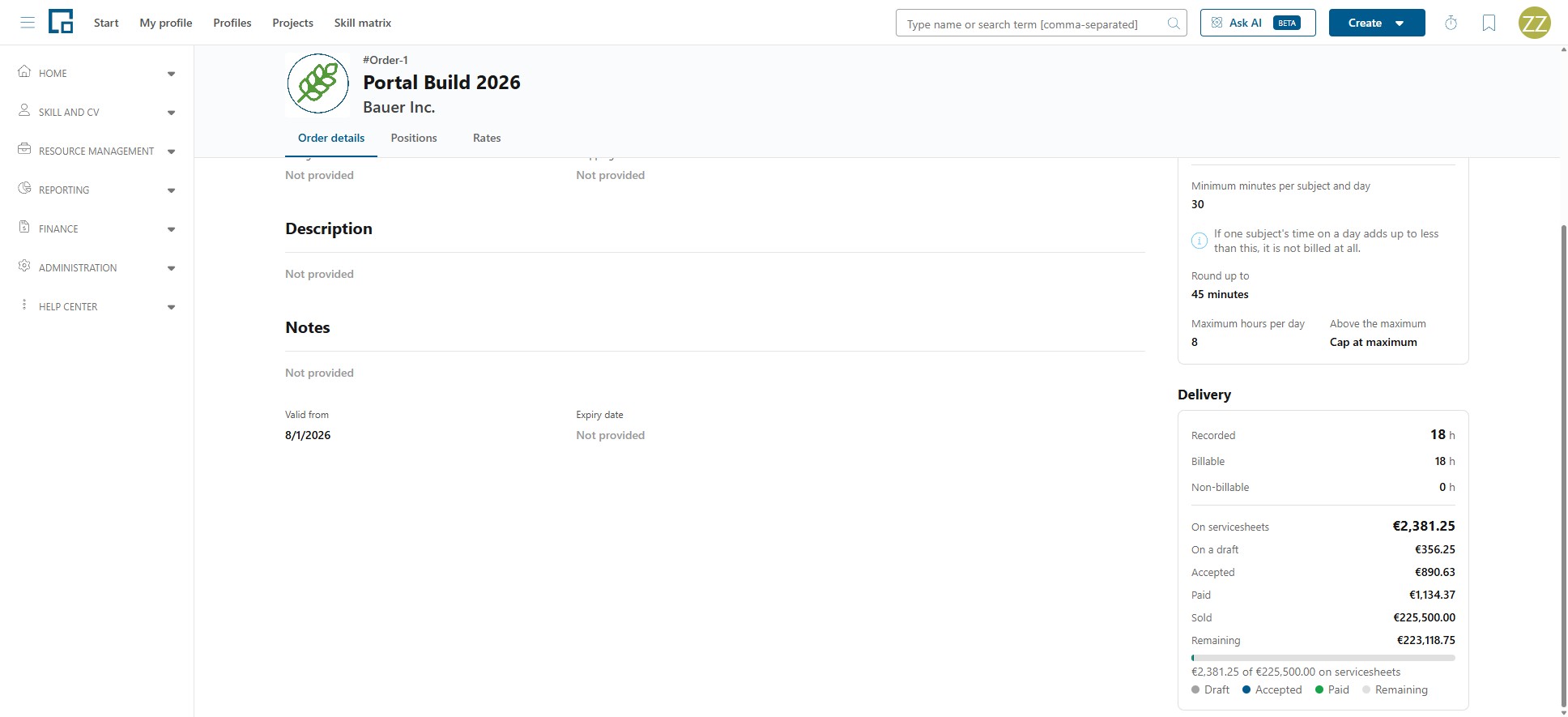
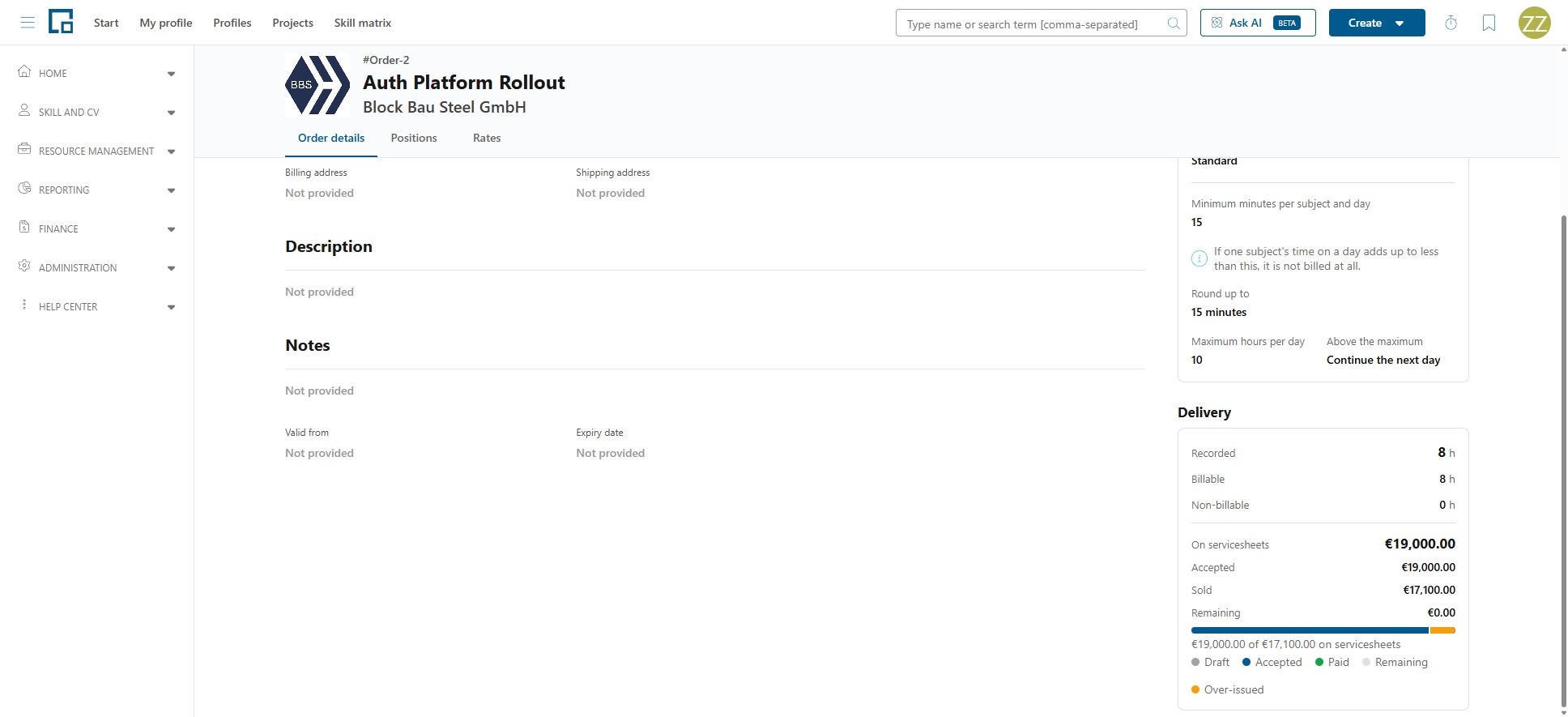
The order's Delivery section breaks the same picture down for one order, and each position has the same figures of its own, in the position's side drawer and behind the info icon on the positions grid. It reads:
| Row | Meaning |
|---|---|
| Recorded | Every hour recorded against the order or the position, billable or not. |
| Billable | The part of it that may be charged. |
| Billable after rules | Shown only where the duration rules changed the figure. |
| On servicesheets | The amount on servicesheets that have not been withdrawn. The three rows below add up to it. |
| On a draft | On a servicesheet that has not been accepted yet. |
| Accepted | Agreed with the customer, not yet paid. |
| Paid | Settled. |
| Sold | The agreed volume: the lump sum, or rate × sold quantity. |
| Remaining | What is sold but not yet on any servicesheet. |
| Over-issued | Only when more is on servicesheets than was sold: the part that exceeds the agreed volume. |
A bar shows the same split. Within the agreed volume the bar is that volume, filled by the draft, accepted and paid shares. Once more is on servicesheets than was sold, the bar stretches to cover the issued total instead, the agreed volume is marked inside it, and only the part beyond that mark is drawn in the warning tone, so how far over it went stays readable rather than just "full". A position with no rate or no agreed quantity has no maximum to measure against. Its bar is drawn all the same: empty while nothing has been billed, and, as soon as anything is, wholly in the warning tone, because every cent of it is beyond a volume of nothing. A note beside it says no rate or quantity is set yet.
The billing comment is a free-text note you can leave on a recorded entry while composing a servicesheet, typically why that time was, or was not, billed. It belongs to the entry rather than to the servicesheet, so it stays with the time even if the draft it was written on is withdrawn, and it is there again the next time that entry comes up for billing. It lives entirely on the billing side: the person who recorded the time does not see it in their timesheet, and both reading and writing it require Manage billing.
Currencies and totals
An order is billed in one currency. The currency is set on the order and is required. Everything underneath it follows: its positions, its rates, the amounts on its Delivery figures and the servicesheets composed from it are all in that one currency. There is no per-position currency to set or to keep in step.
Once a servicesheet exists for the order that has not been withdrawn, the currency can no longer be changed, because the agreed volume it is measured against would be relabelled while the servicesheets keep the currency they were issued in, leaving the two no longer comparable. The field then shows the reason on hover. Withdrawing every servicesheet on the order releases it again.
A currency is also set on the framework agreement and on each rate entry, which is what the order is prefilled from. Amounts are never converted between currencies. Where a total spans several (an agreement's orders, or a period across orders on Billable work), it is shown once per currency rather than added up.
A servicesheet shows a Net total only.
Permissions
| Permission | Covers |
|---|---|
| Manage accounting | A single yes/no over rates, rate cards and framework agreements, plus company-wide reach over the orders and project-level billing of every project. |
| Manage billing | A single yes/no that gates everything to do with servicesheets (including accepting, marking paid and withdrawing), plus billable work and the servicesheet policies. |
| Manage project billing and orders | Orders and the project's Accounting and Delivery tabs, project by project. |
Manage accounting and Manage billing are independent: neither implies the other, so the full accounting-and-billing job needs both.
Manage project billing and orders takes three values:
| Value | Meaning |
|---|---|
| None | "No billing management; cannot create orders." |
| Own data | "Manage the orders you created and create new orders." |
| All data | "Manage billing and orders on all projects." |
A project contact type can grant Manage billing and orders on the individual projects somebody is a contact for. Manage accounting grants the same reach over every project, whatever this value says.
Note that seeing rates and creating servicesheets are different things: managing an order exposes its rates, but composing and accepting a servicesheet always requires Manage billing.
Detailed guides
- Framework Agreements: the commercial frame with a customer, its projects and its agreed rates.
- Orders & Positions: what the customer ordered, the lines it is made of, and the project's Accounting tab.
- Billable Work: what could be billed right now, by period and by order.
- Servicesheets: composing a servicesheet and taking it from draft to paid.